Nowadays and more and more, the role of video in content mHow To Edit Videos on Sony Vegas Proarketing is becoming more important, since it is the easiest, fastest, and most comfortable way for users to consume. The great growth of YouTube, the rise of videos on Facebook, and on other channels such as Twitter, Instagram, Vimeo or Vine, make it great for a Community Manager to know how to edit them. Of course that if you want, you can edit videos for a personal purpose as well.
Therefore, we will explain a step by step on how to use one of the most outstanding current programs to create and edit videos with your PC, Sony Vegas Pro. Let’s get started!
What Is It About?
Let’s start from the beginning and if you did not know this program what is it about, we will explain it to you here.
This powerful software has an aesthetic following the Sony line that is somewhat different from others such as Premiere or Final Cut, although the interface allows us to fully customize all the modules around the timeline. It also has a version called Movie Studio for less advanced users.
Sony Vegas is a very powerful tool but at the same time quite difficult to handle for beginners. This program stands out for its high-resolution device captures as well as 300 different types of effects and transitions.
What we can do with the audio also deserves a separate chapter in the fantastic Sony Vegas, since it has a platform that integrates several tracks simultaneously and effects.
How To Use It?
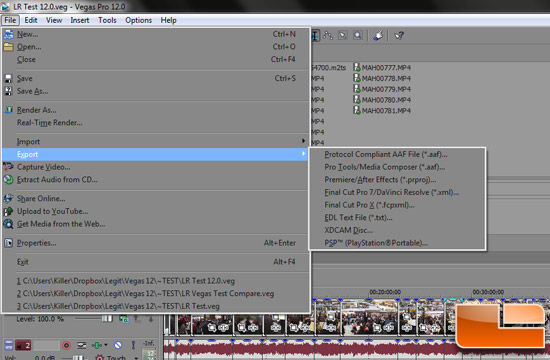
Step 1: Create a new document. Click “File” and “New” at the top and press “OK”.
Step 2: Add some scenes to work by going to ‘File’, ‘Import’, ‘Media’ and select a video clip and song to import. Click on the ‘Project Media’ tab.

Step 3: Create a video track and an audio track. Right-click on the side panel below 00: 00: 00.00 and click ‘Add Video Track’ and then click ‘Add Audio Track’.
Step 4: Drag the song onto the bottom track (the audio track) and drag the video clip onto the top track. If the video has audio included, another track will be created. If you don’t want this audio, delete the audio track that the system creates. After your video is placed there, select 15 seconds by clicking on the clip. You will see a line running through it. Click “s” to split the medium in two and remove the second half.
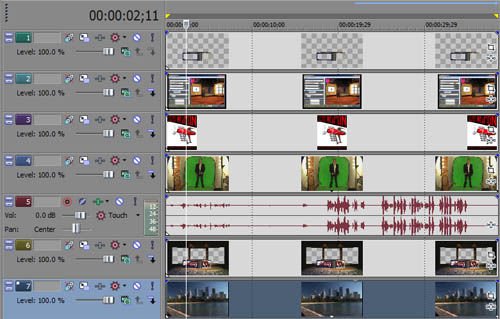
Step 5: Make the remaining clip fade. Click in the upper left corner of the clip and while holding the mouse button down, drag it to the right when you want it to fade away.
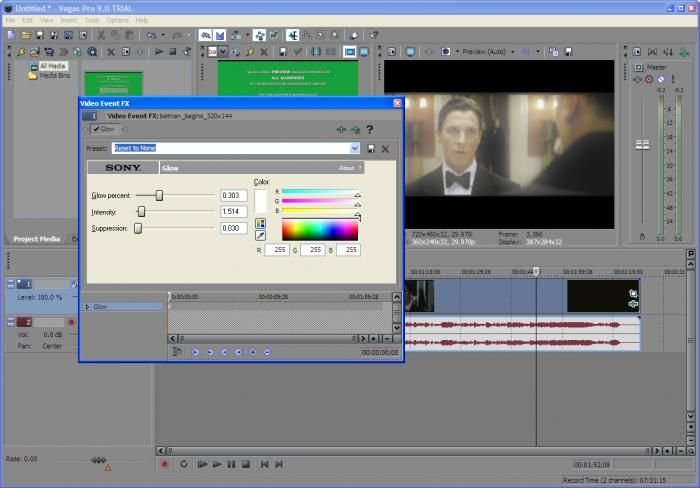
Step 6: Mix two 2 clips. Go close to the 8-second mark and click “s” again to split these clips. Once done, click on the second clip and drag it a bit on the first clip. After this, dim the second clip. Cut the audio using the same method to match the length of the clip; you can use fade and appear.
Step 7: Select “File,” “Render As” and save it. Click on the video you have saved and see how it looks like.
Main Pros and Cons
Perhaps the best thing is not only the number of sound effects it offers, but they can also be easily customized, as long as we are used to the different buttons and actions of this video editor.
The main advantages of Sony Vegas are its excellent interface, a stable as well as a perfect performance, a huge number of effects and transitions, but mainly, the finished work is worthy of every video editing professional.
Its only disadvantage is that starting to use this video editor requires a lot of training since it is not only about trying it out, but also getting to know each function in depth. However, the tutorials that we offered you is a great ally for learning how to edit videos with Sony Vegas Pro.
Also don’t forget that vegas offer composition tools, 24-bit / 192 kHz audio support, VST, and DirectX plug-in effect support, and Dolby Digital surround sound mixing. Up to version 10, Vegas Pro runs on Microsoft Windows XP (32-bit), Vista, and 7 (32-bit and 64-bit editions). Version 11 abandoned support for Windows XP.
As a positive point, we must highlight the file formats that Aceota, which are for Video files: AVI, DV, SWF, MPEG 1 and MPEG 2; audio files such as WAV, MP3, AIF, Audio CD, and PCA and image files such as BMP, GIF, JPG, and PSD.
In these times, thanks to YouTube and other video portals, image and audio have acquired singular importance not only in the lives of professionals but particularly in our social relationships. It is worth considering all the virtues of the quintessential video editor, the undisputed Sony Vegas.